You just launched your SaaS on Go-Publicly. The upvotes are rolling in. Your newsletter blast went out. People are clicking your link. And then they land on your site… and leave.
This is the painful reality for most indie founders after a launch. They spend weeks preparing the product, crafting the landing page, and timing the announcement. But when the traffic actually arrives, they have no idea what is converting and what is not. No system. No data. No second chance with those visitors.
Optibase review searches are rising fast among SaaS founders and indie makers because people are finally realizing that getting traffic is only half the equation. The other half is conversion.
This in-depth Optibase review covers everything you need to know: what the platform does, who it is built for, what it costs, how it compares to alternatives, and how Go-Publicly founders can use it to turn launch momentum into sustainable revenue.
What Is Optibase?
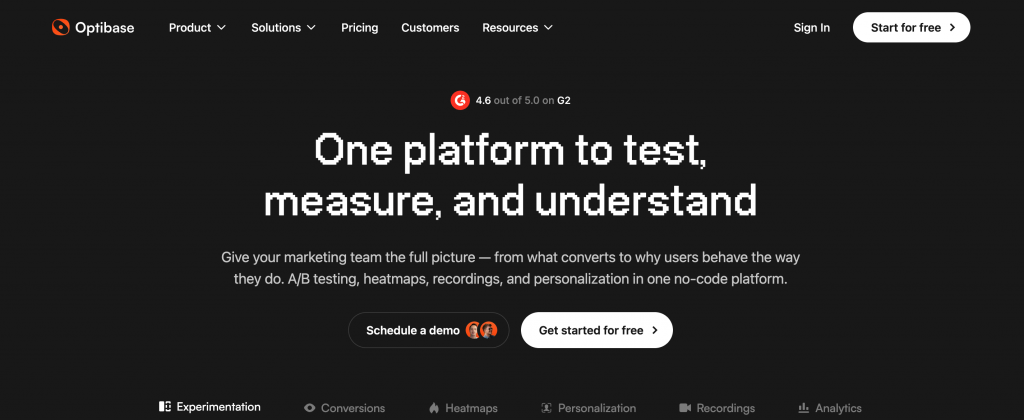
Optibase is an A/B testing and website optimization platform built specifically for no-code and low-code website builders. It was built by the team at Flowout and is designed to make conversion rate optimization accessible to founders, marketers, and agencies who do not want to involve a developer every time they want to run an experiment.
At its core, Optibase lets you create two or more versions of a page or individual page elements, split your incoming traffic between them, and measure which version drives more of the outcomes you care about: signups, demo requests, purchases, or any custom conversion event you define.
Unlike enterprise CRO tools that require dedicated specialists to set up and interpret, Optibase is built around the idea that a non-technical marketing manager or solo founder should be able to go from idea to live test in under 30 minutes.
It currently holds a 4.6 out of 5 rating on G2 based on verified user reviews. That is not just a vanity number. The reviews consistently highlight the same theme: speed of setup and clarity of results.
Why A/B Testing Matters After Your Product Launch
Here is the thing most indie founders miss: a product launch is not the finish line. It is the starting gun.
When you launch on Go-Publicly, you get a window of concentrated attention. Early adopters visit your site. Curious makers check out your product. Newsletter readers click through. This traffic is warmer and more intentional than almost anything you will get from cold SEO for months.
But if your landing page is not optimized, you are throwing that attention away.
According to data from the Baymard Institute, conversion rates on SaaS landing pages typically fall between 2% and 5%. That means if 1,000 people visit your site after a launch, only 20 to 50 sign up on average. The other 950 to 980 leave without taking action.
A/B testing lets you systematically improve that number. You test your headline. You try two different CTA buttons. You experiment with your pricing table layout. Each experiment gives you data, not guesses.
For founders who have just launched on Go-Publicly and are building their initial user base, even a 1% improvement in conversion rate can mean the difference between 30 signups and 60 signups from the same amount of traffic. Over time, these gains compound.
The problem has always been that A/B testing tools were either too complex (Optimizely, VWO) or too limited (basic free tools). Optibase is trying to close that gap for the indie founder segment.
Optibase Features: What You Actually Get
A/B Testing
The core product is a clean, visual A/B testing interface. You define a control (your existing page or element), create one or more variants, and Optibase automatically splits incoming traffic between them.
There is no code editor required. You select elements visually, make changes, and publish. The test begins immediately.
Results are shown in a live dashboard with conversion rates, statistical confidence levels, and a clear indication of which variant is winning.
Split URL Testing
If you want to test entirely different page designs rather than tweaks to existing elements, Optibase supports split URL testing. This is useful for comparing two completely different landing page approaches without needing to set up a redirect manually.
Multivariate Testing
For teams that want to test multiple variables simultaneously rather than one change at a time, Optibase offers multivariate testing. This shows you which combination of changes produces the best results rather than requiring sequential single-variable experiments.
Heatmaps
Optibase added heatmap functionality in 2025. Heatmaps show you exactly where your visitors click, scroll, and spend time on the page. Before you even run an A/B test, heatmaps tell you what is working and what is being ignored.
This closes the research loop. You can now move from “what should I test” to “I see from the heatmap that nobody is clicking my secondary CTA” to “I will run a test that makes that CTA more prominent.” All in one tool.
User Recordings
Session recordings show you real playback of how individual visitors navigate your site. You see mouse movements, scrolling behavior, clicks, and hesitation points. This is the qualitative complement to the quantitative data from A/B tests.
Conversion Tracking
Optibase allows you to define custom conversion goals: button clicks, form submissions, page visits, scroll depth. You are not limited to tracking only purchases. This matters for SaaS founders in early stages where signups and activation events are the metrics that count.
Personalization
The personalization feature lets you show different content to different visitor segments. You can target by traffic source (for example, show a custom message to visitors coming from Go-Publicly), by device type, or by other behavioral signals.
Analytics
Built-in analytics show test performance over time. Because Optibase manages its own data layer, you do not have to manually stitch together data from multiple tools to understand your test results.
Who Is Optibase Built For?
Optibase is not for everyone. It is deliberately positioned for a specific type of user, and that positioning is both its strength and its limitation.
It is a strong fit for:
- SaaS founders and indie makers running sites on Webflow, WordPress, Elementor, Divi, Bricks, Gutenberg, Oxygen, or Breakdance.
- Marketing managers who want to run experiments without scheduling developer time.
- Agencies that manage multiple client sites and need to offer CRO as a service without per-client developer costs.
- Early-stage startups that want real data on what converts before investing in paid acquisition.
It is a weaker fit for:
- Teams running fully custom-coded applications where a native integration is not available.
- Enterprise organizations with complex data governance requirements or multi-channel experimentation needs at scale.
- Teams that need server-side feature flagging tightly integrated with their backend application logic.
For Go-Publicly founders specifically, Optibase hits a sweet spot. Most indie makers build their landing pages on Webflow or WordPress. They are moving fast, they do not have a dedicated developer, and they need to move from “I have a launch traffic spike” to “I am learning what converts” quickly. That is exactly the problem Optibase solves.
Optibase Pricing: Is It Worth the Cost?
Optibase offers four published pricing tiers:
- Free: A working free plan with no credit card required. This is a genuine free tier, not a trial countdown.
- Basic: Entry-level paid plan for lower traffic sites.
- Business: Mid-tier plan with higher traffic limits and expanded feature access.
- Professional: Full access to all features with the highest session and visitor limits.
Paid plans start at $69 per month, with a significant discount for annual billing (two months free). For enterprise needs above 250,000 monthly visitors, custom pricing is available on request.
For context, Webflow Optimize (Webflow’s own native testing product) sits at a substantially higher price point. Optibase explicitly markets itself as 4x cheaper than Webflow Optimize while delivering comparable core testing functionality.
For a bootstrapped SaaS founder, spending $69 per month on conversion testing is justified even if it lifts your conversion rate by a fraction of a percent on meaningful traffic volume. The math usually works in your favor quickly, especially after a high-traffic launch.
The free plan is a legitimate starting point if you are still in pre-launch or early traffic stages.
Optibase vs. The Alternatives
Founders evaluating Optibase typically compare it against a handful of other tools. Here is a practical breakdown:
| Tool | Best For | Starting Price | No-Code Friendly | Webflow Native |
|---|---|---|---|---|
| Optibase | Indie founders, Webflow/WP teams | $0 (free plan) | Yes | Yes |
| VWO | Mid-market teams with complex needs | $199/mo | Partial | No |
| Optimizely | Enterprise experimentation programs | Custom (high) | No | No |
| Crazy Egg | Heatmaps plus basic testing | $29/mo | Yes | No |
| GrowthBook | Data-driven, developer-led teams | Free (self-host) | No | No |
| PostHog | Product analytics plus experimentation | Free tier available | No | No |
The clearest Optibase differentiator is the combination of native Webflow integration, accessible pricing, and a feature set that now extends beyond basic testing to include heatmaps and session recordings.
If you are building on Webflow, the native integration advantage is significant. Most other tools treat Webflow as an afterthought or require custom code workarounds. Optibase was built for it from the start.
For teams that need full programmatic experimentation with server-side feature flags and deep analytics integration, GrowthBook or PostHog are more appropriate. But they require developer investment that most indie founders cannot afford in the early stages.
How Go-Publicly Founders Can Use Optibase to Maximize Launch Results
The strategic connection here is direct and practical.
When you launch your product on Go-Publicly, you are tapping into a community of early adopters, indie makers, and SaaS buyers actively looking for new tools. If you have a Featured listing, you get newsletter placement to 7,000+ subscribers plus priority placement on the platform. That is real, warm traffic hitting your site in a concentrated window.
Here is a recommended workflow for using Optibase around your Go-Publicly launch:
Before launch: Use Optibase’s heatmap tool on your existing landing page (if you have prior traffic) to identify where visitors drop off or fail to click your primary CTA. Fix the most obvious friction points before launch day traffic arrives.
During launch: Set up a personalization rule in Optibase to show a custom message specifically to visitors arriving via your Go-Publicly referral URL. A welcome message tailored to the indie maker audience can significantly increase the connection a new visitor feels and improve your conversion rate on that segment.
After launch: With the traffic spike from Go-Publicly, you now have enough visitors to run statistically meaningful A/B tests. Test your headline, your pricing table, your signup CTA, or your social proof section. The data you collect in this concentrated window is invaluable for the months of growth ahead.
Long-term: Use session recordings to watch how your launch visitors navigated your site. Where did they hesitate? What did they miss? This qualitative data feeds your next round of optimization.
Go-Publicly is the ignition. Optibase is what you do with the fire.
Real User Results with Optibase
The Optibase customer case studies are specific enough to be credible:
Memberstack reported a $500,000 revenue increase attributed to A/B testing experiments run through Optibase. Memberstack is a SaaS product built on Webflow, which makes this a directly relevant data point for the Go-Publicly community.
Style Arcade, a B2B SaaS company, increased their demo conversion rate through Optibase testing on their Webflow marketing site.
Rokoko, a motion capture tech company, used Optibase to increase revenue-driving actions on their site.
These are not consumer brands with enormous advertising budgets. They are SaaS companies and product teams, which closely mirrors the Go-Publicly founder demographic.
The pattern in G2 reviews is consistent: the tool delivers measurable results when founders commit to a testing habit rather than treating it as a one-off setup. The users reporting the strongest outcomes are those who treat testing as an ongoing practice.
Limitations to Know Before You Sign Up
No honest review skips the limitations. Here is what to be aware of before committing:
Platform dependency. Optibase is purpose-built for specific page builders. If your product runs on a fully custom-coded React or Next.js application, verify whether the integration works for your specific stack before committing.
Traffic requirements for significance. A/B testing requires statistical significance to produce reliable results. If your site gets under 1,000 monthly visitors, running tests will take a long time before you can trust the data. Optibase provides a free sample size calculator and a test duration calculator to help you understand the math upfront.
Webflow experience is more polished. Some G2 reviewers on platforms outside Webflow noted that the Webflow integration is notably smoother than other builder integrations. If you are on WordPress, the experience is solid but not identical.
No server-side testing. Optibase operates at the front-end layer. If you need to test pricing logic, feature flags, or backend behavior, you will need a tool like PostHog or GrowthBook that supports server-side experimentation.
These are real constraints, not dealbreakers. But knowing them upfront saves you time during evaluation.
Key Takeaways
- Optibase is a no-code A/B testing and CRO platform built for indie founders, SaaS teams, and agencies using Webflow, WordPress, and other major page builders.
- Core features include A/B testing, split URL testing, multivariate testing, heatmaps, user recordings, personalization, and conversion tracking.
- Pricing starts with a genuine free plan and paid plans from $69 per month, significantly underpricing enterprise alternatives like VWO and Optimizely.
- Optibase holds a 4.6 out of 5 rating on G2, driven by ease of setup and clarity of results for non-technical users.
- For Go-Publicly founders, Optibase is a high-leverage tool for converting launch traffic into signups and paying users using real behavioral data.
- The biggest limitation is platform dependency: it works best for Webflow sites and standard page builders, not fully custom-coded applications.
Frequently Asked Questions (FAQs)
Q: What is Optibase used for?
Optibase is an A/B testing and website optimization platform. It lets founders and marketers run experiments on their landing pages to find which version of a headline, CTA, or page layout drives the most conversions. It also includes heatmaps, user recordings, and personalization features, making it a full-stack CRO tool for no-code builders.
Q: Is Optibase free to use?
Yes. Optibase offers a free plan with no credit card required. Paid plans start at $69 per month. The free plan is a genuine starting point for early-stage founders who are not yet generating enough traffic to run statistically significant tests, not a limited-time trial.
Q: Does Optibase work with Webflow?
Yes. Optibase was built with a native Webflow integration and is widely considered the best A/B testing option for Webflow sites. It is available as a Webflow app and requires no custom code to set up. It also supports WordPress, Elementor, Divi, Bricks Builder, Gutenberg, Oxygen, and Breakdance.
Q: How much traffic do you need to use Optibase?
Optibase recommends using their free sample size calculator to understand the minimum traffic required for your test to reach statistical significance. As a general rule, you need at least a few hundred conversions per variant to trust your results. Low-traffic sites can still use heatmaps and session recordings productively while waiting for traffic to grow.
Q: How does Optibase compare to Optimizely?
Optibase is a fraction of the cost of Optimizely and significantly easier to set up for non-technical users. Optimizely is built for enterprise teams running complex, multi-channel experiments with dedicated CRO specialists. Optibase is built for founders and marketers who want to move fast on conversion testing without technical overhead or enterprise pricing.
Q: Can I use Optibase after launching on Go-Publicly?
Absolutely. Go-Publicly drives concentrated warm traffic to your site during a launch window. Optibase lets you capture that traffic data, run experiments on your landing page in real time, and systematically improve your conversion rate during and after the launch. The combination of Go-Publicly for discovery and Optibase for conversion is a strong pairing for early-stage SaaS growth.
Ready to Convert Your Next Launch?
Getting your product discovered is only the beginning. The founders who grow past launch are the ones who have a system for turning traffic into users.
Launch on Go-Publicly to get your product in front of 7,000+ early adopters, indie makers, and SaaS buyers. Then set up Optibase to make sure every visitor has the best possible chance of converting.
Both platforms are built for founders who want to move fast, stay lean, and grow with real data instead of guesswork.
Want more? Upgrade today to the PRO version.

Founder and builder working on internet products and startup tools. Passionate about launching simple platforms that help makers showcase their work and reach early users.
Pingback: BlazeHive Review: Why Indie Founders Are Firing Their SEO Agencies in 2026