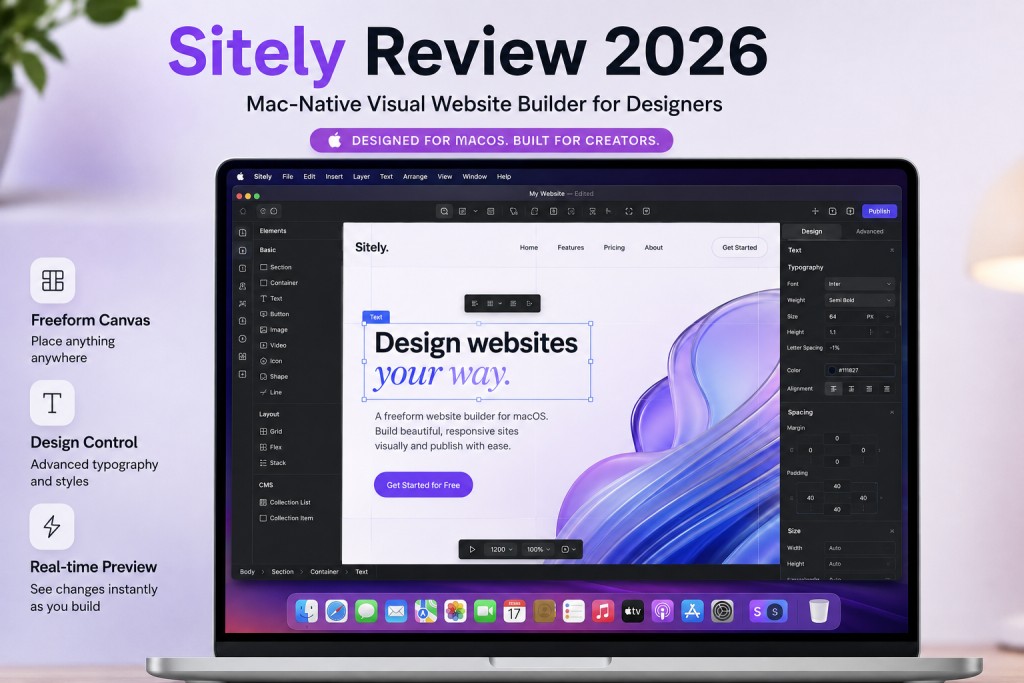
If you have been searching for the best website builder for Mac, you have probably noticed a pattern: most “Mac website builder” roundups just recommend browser-based tools like Wix or Squarespace that happen to work in Safari. Those are not Mac-native.
They are web apps that run the same on Windows, Mac, or a Chromebook. Sitely is different. It is the only serious, Mac-native visual website builder that installs on your machine, runs offline, and gives you the kind of freeform design control that Mac users expect from native software. Formerly known as Sparkle, the app rebranded in late 2024 and has since shipped AI-powered site generation, built-in performance optimization, and one-time pricing that makes subscriptions look like a bad deal. We tested it from free tier through Pro to see if it lives up to the promise.
Why Most “Mac Website Builders” Are Not Actually Mac-Native
When you search for the best website builder for Mac, Google serves you listicles featuring Wix, Squarespace, Weebly, and WordPress. These are browser-based platforms. They work on any device with a web browser. Calling them “Mac website builders” is like calling Netflix a “Mac movie player.”
A genuinely Mac-native website builder runs as a desktop application on macOS. It uses your Mac’s GPU for rendering. It works offline. It integrates with macOS features like Finder, drag-and-drop from Photos, and system fonts. That is a fundamentally different experience from editing a website in a Chrome tab.
Sitely is one of the very few tools that fits this definition. It is built for macOS (and now iPad), designed to feel like Apple’s own productivity apps, and it produces standard HTML files you own and host anywhere.
Key Takeaways
- The best website builder for Mac in 2026 is Sitely: a native macOS app (formerly Sparkle) with a freeform canvas similar to Apple Keynote or Pages, giving you pixel-level design control without code.
- Pricing starts at $0 (free, 1 site, 3 pages) and goes up to $119.99 one-time for Pro. There is no monthly subscription trap.
- It generates clean, fast-loading HTML/CSS/JS files you can host anywhere via FTP/SFTP, meaning zero vendor lock-in.
- The app handles image compression, code minification, and cross-browser compatibility automatically.
- Unlike browser-based builders, Sitely works offline, uses native macOS performance, and does not inject any tracking or cookies into your sites.
What Makes Sitely the Best Website Builder for Mac?
This is not a stripped-down Canva clone. Sitely ships a genuinely deep feature set that competes with tools costing significantly more per year. Here is what makes it the strongest Mac website builder available right now.
Visual, Freeform Canvas Editor
Unlike grid-based builders like Squarespace or section-based tools like Wix, Sitely gives you a true freeform canvas. You place elements wherever you want. Resize, rotate, overlap, layer. If you have ever used Apple Pages or Keynote, the interaction model will feel immediately familiar.
This is not just a cosmetic difference. Freeform layout means you are not fighting a template’s assumptions about where your hero section ends and your features grid begins. For portfolio sites, creative agencies, and anyone who wants a design that does not look like every other Squarespace template, this matters.
AI Website Generator
Sitely’s AI assistant lets you describe what you want in natural language and generates a full page layout from the prompt. It is not perfect, and you will almost certainly want to adjust the output, but as a starting point it cuts setup time dramatically. The team explicitly positions this as “AI-assisted, not AI-generated,” which signals a design-first philosophy rather than full automation.
Built-In Performance Optimization
Every site Sitely exports gets automatic image compression (WebP conversion where supported), CSS/JS minification, lazy loading, and clean semantic HTML. In testing, exported sites consistently score 90 or above on Google PageSpeed Insights without any manual optimization.
This is a significant advantage over hosted platforms where performance depends on the platform’s infrastructure and your theme’s code quality.
Publish Anywhere via FTP/SFTP
Sitely generates standard HTML, CSS, and JavaScript files. You publish them to any web host using the built-in FTP/SFTP client. This means:
- No vendor lock-in. You own your files.
- You can host on any provider (Cloudflare Pages, Netlify, traditional shared hosting, your own VPS).
- Monthly hosting costs can be as low as $0 if you use a free-tier static host.
Additional Notable Features
- Parallax animations and scroll effects built into the visual editor.
- Lottie and Rive animation support for vector animations.
- E-commerce and appointment scheduling integrations for small business sites.
- Dark mode support with automatic light/dark switching.
- Responsive design controls per breakpoint (desktop, tablet, mobile).
- Figma plugin for importing designs directly.
- SEO tools including meta tags, Open Graph settings, sitemap generation, and alt text management.
Sitely 7 Preview (Coming Soon)
As of mid-2026, the Sitely team has been previewing version 7 features including a QuickLook plugin for macOS Finder thumbnails and granular hover animation grouping. These are incremental but show active development momentum.
Sitely Pricing Breakdown (2026)
One of Sitely’s strongest selling points is its pricing model. In an industry dominated by $15-$45/month subscriptions, Sitely offers genuine one-time purchase options.
| Plan | Price | Websites | Pages | Key Features |
|---|---|---|---|---|
| Free | $0 | 1 | 3 | Basic editor, “Made with Sitely” badge |
| Personal | $79.99 (one-time) | Unlimited | Unlimited | AI website generator, no badge |
| Pro (Annual) | $59.99/year | Unlimited | Unlimited | E-commerce, advanced SEO, all updates |
| Pro (One-time) | $119.99 (one-time) | Unlimited | Unlimited | E-commerce, advanced SEO |
The free tier is genuinely usable for a simple personal page or portfolio, though the 3-page limit and branding badge will push most users toward a paid plan quickly.
The one-time Pro purchase at $119.99 is where the value equation gets interesting. Compare that to Squarespace Business at $33/month ($396/year) or Wix Business at $17/month ($204/year). If you plan to use a website builder for more than a few months, the math favors Sitely heavily.
Important note: The one-time purchase covers the current major version. Future major upgrades (e.g., Sitely 8) may require a separate purchase, while the subscription plan includes all updates automatically. The 14-day free trial gives you full Pro access with no credit card required.
Pros: What Mac Users Will Love
True design freedom. The freeform canvas is not a gimmick. It genuinely lets you build layouts that would be impossible or painfully difficult in grid-based builders. If you have a specific visual vision for your site, Sitely will not fight you.
Mac-native performance. Because it runs natively on macOS (not in a browser tab), the editor is fast and responsive even with complex pages. No lag, no loading spinners, no “please wait while your changes save.”
One-time pricing. In 2026, finding a capable website builder that does not charge monthly is increasingly rare. The $119.99 one-time Pro plan pays for itself within 4-6 months compared to Squarespace or Wix.
Zero vendor lock-in. Your site is a folder of HTML files. If you decide to leave Sitely, your website still works. Try doing that with Squarespace.
Automatic optimization. Image compression, code minification, and lazy loading happen without you thinking about them. This is how it should work everywhere, but it does not.
Privacy-respecting. Sitely does not inject tracking scripts, analytics, or cookies into your published sites. What you build is what gets deployed.
Cons: Where Sitely Falls Short
Mac only. If you or anyone on your team uses Windows or Linux, Sitely is not an option. There is no web-based fallback editor and no announced plans for cross-platform support.
How Sitely Compares to Squarespace and Wix on Mac
| Feature | Sitely | Squarespace | Wix |
|---|---|---|---|
| Platform | Mac desktop app | Browser-based | Browser-based |
| Pricing | $0-$119.99 one-time | $16-$49/month | $17-$35/month |
| Hosting included | No | Yes | Yes |
| Design freedom | Freeform canvas | Grid/template | Flexible grid |
| Vendor lock-in | None | High | High |
| E-commerce | Basic (Pro) | Strong | Strong |
| App marketplace | No | Yes | Yes (800+ apps) |
| AI features | AI site generator | AI text/design | AI site builder |
| Performance | Excellent (static files) | Good | Variable |
| Blogging | Good | Excellent | Good |
| Best for | Mac designers/creators | Visual businesses | Feature-heavy sites |
Bottom line: If you value design control and cost efficiency over convenience and ecosystem, Sitely wins. If you want hosting, e-commerce, and integrations handled for you, Squarespace or Wix are better fits.
Who Is This Mac Website Builder Best For?
Based on testing and user reviews across Capterra, G2, and the Apple App Store, Sitely is ideal for:
- Freelancers and solo entrepreneurs who need a professional site without monthly costs eating into margins.
- Designers and creatives who find template-based builders restrictive and want pixel-level control.
- Mac power users who prefer native apps over browser-based tools.
- Privacy-conscious builders who do not want their site builder injecting tracking scripts.
- Portfolio and agency sites where unique visual design is a competitive advantage.
- Anyone who already has web hosting and wants a better tool for building what goes on it.
If you are launching a product and want to get it in front of early adopters, platforms like Go Publicly can help you reach the right audience on launch day. Sitely is the tool you use to build the site; Go Publicly is where you announce it to people who care.
Who Should Look Elsewhere?
- Windows or Linux users. There is no version for your platform.
- E-commerce-heavy businesses. If you need inventory management, payment processing, shipping calculators, and a full storefront, Shopify or Squarespace Commerce are better fits.
- Teams that need collaborative editing. Sitely is a single-user desktop app. There is no real-time collaboration, no multi-editor access, no version history in the cloud.
- People who want all-in-one simplicity. If “set up hosting” and “configure FTP” sound intimidating, a hosted platform will serve you better.
- Content-heavy blogs. Sitely’s blogging capabilities are functional but basic. WordPress or Ghost are far better if content is your primary output.
Frequently Asked Questions (FAQs)
Q: Is Sitely the same as Sparkle website builder? A: Yes, Sitely is the rebranded version of the Sparkle website builder. The app was renamed in late 2024 but is built by the same team (Crinon SRL) and maintains full backward compatibility with Sparkle project files.
Q: Does Sitely include web hosting? A: No, Sitely does not include hosting. It generates standard HTML, CSS, and JavaScript files that you publish to your own web host via built-in FTP or SFTP. You can use any hosting provider, including free static hosts like Cloudflare Pages or Netlify.
Q: Is Sitely free to use? A: Sitely offers a free plan limited to 1 website and 3 pages with a “Made with Sitely” badge. Paid plans start at $79.99 one-time for Personal and $119.99 one-time for Pro. A 14-day free trial of Pro is available with no credit card required.
Q: Can I use Sitely on iPad? A: As of 2026, Sitely positions itself as a website builder for iPad and Mac. The latest version supports iPad with the same visual editor experience available on macOS, making it one of the few professional website builders available on Apple’s tablet platform.
Q: How does Sitely compare to Squarespace for beginners? A: Squarespace is easier for absolute beginners because it includes hosting, templates, and a structured editor. Sitely offers more design freedom but requires you to handle hosting separately and make more design decisions upfront. If you are comfortable with Mac apps like Pages or Keynote, Sitely’s learning curve is manageable.
Q: Does Sitely support e-commerce? A: The Pro plan includes e-commerce features including product pages, shopping cart, and payment processing integrations. However, it is best suited for small catalogs (under 50 products). For large-scale e-commerce operations, dedicated platforms like Shopify are more appropriate.
Q: What happens if I stop paying the Sitely subscription? A: If you are on the annual subscription and stop paying, you lose access to new updates but your existing sites remain fully functional. Sites are standard HTML files hosted on your own server, so they continue working regardless of your Sitely license status. If you purchased the one-time plan, you own that version permanently.
Final Verdict
If you have been searching for the best website builder for Mac and feeling frustrated that every recommendation is just a browser-based platform, Sitely is the answer. It is the only serious Mac-native, no-code visual builder with one-time pricing and zero vendor lock-in. For Mac users who want design control without the complexity of code-based tools like Webflow or the constraints of template-based platforms like Squarespace, Sitely is the strongest option available in 2026.
The $119.99 one-time Pro price makes the financial case easy. You are paying less than three months of Squarespace for a permanent license to a tool that produces faster, cleaner websites.
The deal-breakers are clear: Mac-only, self-hosted, no collaborative editing. If those are problems for you, you already know this is not your tool.
For everyone else, especially freelancers, designers, and solo founders building their online presence, Sitely earns a strong recommendation.
Our rating: 4.3 out of 5
Sitely recently launched on Go Publicly, the fastest-growing product launch platform for indie makers and SaaS founders. You can check out Sitely’s launch page on Go Publicly to upvote, leave feedback, or discover other tools built by independent creators.
Building something of your own? Submit your product on Go Publicly and reach thousands of early adopters, founders, and makers actively looking for new tools.

Founder and builder working on internet products and startup tools. Passionate about launching simple platforms that help makers showcase their work and reach early users.